

VFP Form statusbar and progressbars
Advertising

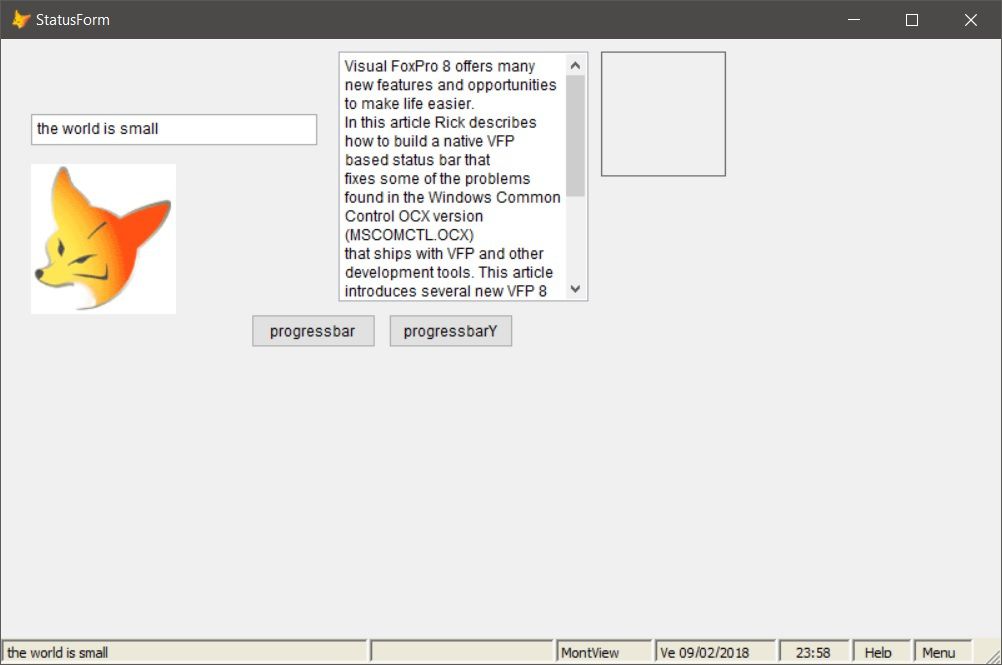
VFP have not a form statusbar.the only one is on vfp ide (under command widow).
the code works around an old class of Weswind "Creating a Statusbar control with VFP 8" can be found in https://www.west-wind.com/presentations/wwstatusbar/wwstatusbar.asp
it attachs to any form a statusbar with pure vfp code (no activeX).
this code illustrates this statusbar with some works around as:
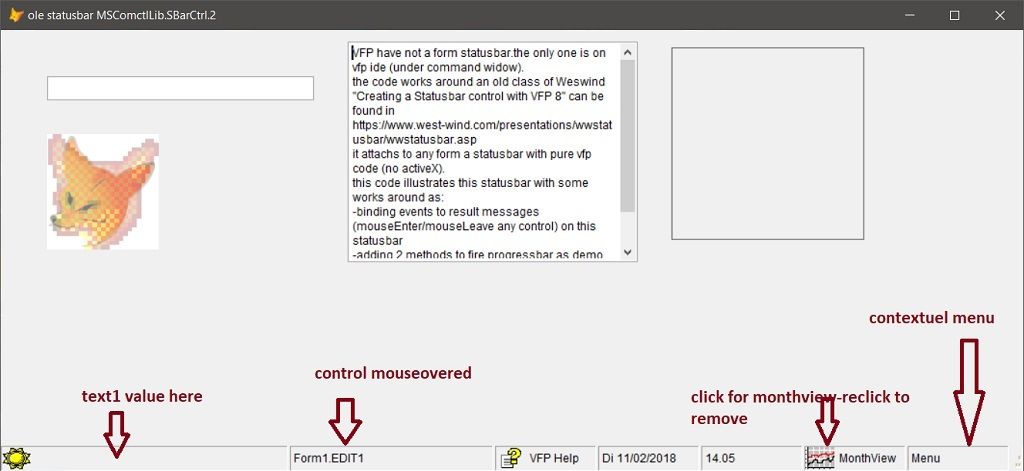
   -binding events to result messages (mouseEnter/mouseLeave any control) on this statusbar
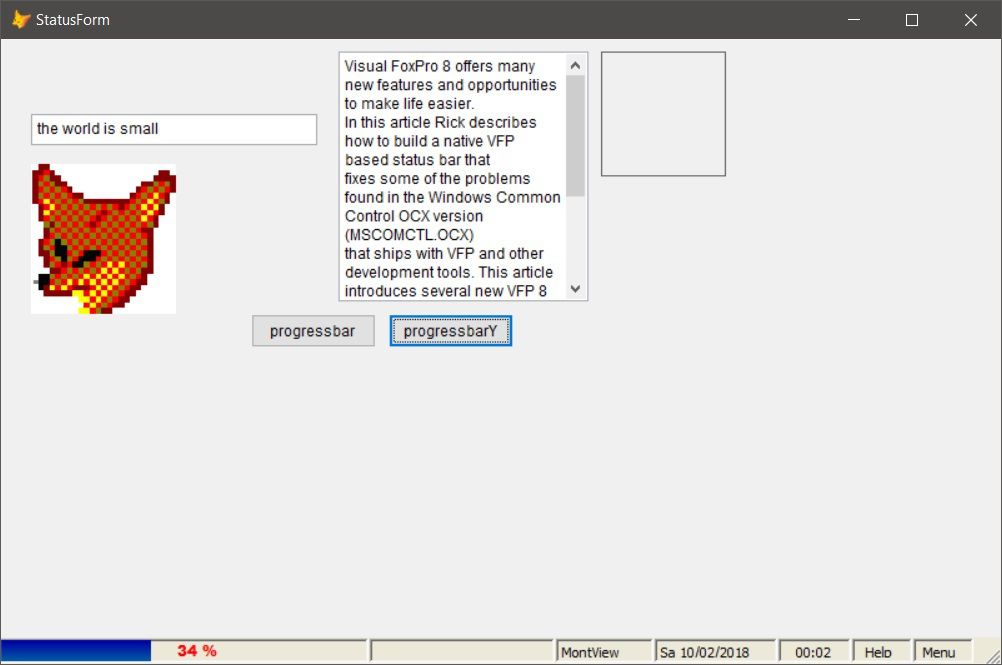
   -adding 2 methods to fire progressbar as demo (to adapt to context)
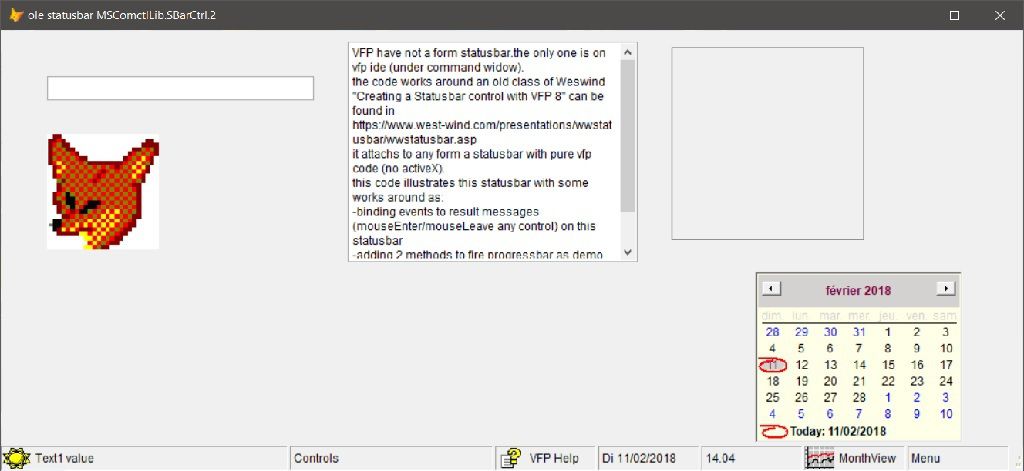
   -firing a monthview from a panel
   -firing vfp help from another panel
   -decorating with date and real time.
   -adding a contextuel custom menu with some custom items.

-can customize the statusbar styles in nstyle class property.i selected the nstyle=2 for this demo.
-all images originally in code are replaced by pictureVal image control property,accepting strings.
-i added an utility to list all MRU (recents used files).
-the forms  can be with ShowWindow=2,1,0
*Note i tried to integrate the olecontrol progressbar [OleClass = "COMCTL.ProgCtrl.1"] in the ostatus container without success.its seems that dont work with collections.
this statusbar is simple,flexible  and dont recquire all a library sometimes>1.5 Moctet !
can add other functionalities to this code.

*in same registry,added an ole statusbar (MSComctlLib.SBarCtrl.2) in code *2* below.

[post 260]
Click on code to select [then copy] -click outside to deselect
*1* created on friday 09 of february 2018
* a form statusbar,progressbars.
*https://www.west-wind.com/presentations/wwstatusbar/wwstatusbar.asp

if !_vfp.startmode=0
on shutdown quit
endi

clea all
close data all

Set Date French
set century on
Set Date short
publi obar
publi m.yrep
m.yrep=addbs(justpath(sys(16,1)))

if !directory(m.yrep+"bmps")
md m.yrep+"bmps"
endi
set defa to (yrep)
set safe off


Public oform1
oform1=Newobject("form1")
oform1.Show
Return
*
Define Class form1 As Form
  Top = 0
  Left = 0
  Height = 500
  Width = 800
  Caption = "StatusForm"
  ShowWindow=2  &&0,1
  borderstyle=3
  Name = "Form1"
  ycl=0

  Add Object ostatus As wwstatusbar With ;
    Top = 252, ;
    Left = 72, ;
    Width = 361, ;
    Height = 21, ;
    Name = "oStatus", ;
    oShadow.Name = "oShadow", ;
    oThumb.Height = 13, ;
    oThumb.Width = 16, ;
    oThumb.Name = "oThumb", ;
    Label1.Name = "Label1", ;
    Image1.Height = 17, ;
    Image1.Width = 2, ;
    Image1.Name = "Image1", ;
    Image2.Height = 16, ;
    Image2.Width = 16, ;
    Image2.Name = "Image2"

  Add Object txtpaneltext As TextBox With ;
    Height = 25, ;
    Left = 24, ;
    Top = 60, ;
    Width = 229, ;
    Name = "txtPanelText"

  Add Object txt As TextBox With ;
    Height = 25, ;
    Left = 224, ;
    Top = 60, ;
    Width = 60, ;
    visible=.F.,;
    Name = "txt"

   Add object edit1 as editbox with ;
   width=200,;
   height=200,;
   left=270,;
   top=10,;
   name="edit1"

   Add object cnt as container with ;
   width=100,;
   height=100,;
   left=270+210,;
   top=10,;
   name="cnt"

   Add object command1 as commandbutton with ;
   width=100,;
   height=27,;
   left=200,;
   top=220,;
   caption="progressbar",;
   name="command1"

   Add object command2 as commandbutton with ;
   width=100,;
   height=27,;
   left=310,;
   top=220,;
   caption="progressbarY",;
   name="command2"

   Add object img as image with ;
   width=100,;
   height=100,;
   left=24,;
   top=100,;
   picture=home(1)+"graphics\gifs\morphfox.gif",;
   name="img"

  Add Object timer1 As Timer With ;
    Top = 72, ;
    Left = 492, ;
    Height = 25, ;
    Width = 49, ;
    Interval = 60000, ;
    Name = "Timer1"

procedure yauthor()
local m.hyp
m.hyp=newObject("hyperlink")
m.hyp.navigateto("https://www.west-wind.com/presentations/wwstatusbar/wwstatusbar.asp")
m.hyp=null
endproc

procedure edit1.init
text to this.value pretext 7 noshow
Visual FoxPro 8 offers many new features and opportunities to make life easier.
In this article Rick describes how to build a native VFP based status bar that
fixes some of the problems found in the Windows Common Control OCX version (MSCOMCTL.OCX)
that ships with VFP and other development tools. This article introduces several new VFP 8
features in passing: Collections, the Emtpy object, AddProperty() and BindEvents and provides
good view of how to utilize and integrate some of these new features in a useful component.
 endtext
procedure yrecents
local oform
oform=newObject("yrecents")
oform.show(1)
endproc

procedure command2.click
with thisform.ostatus
.addobject("yprogressbar1","yprogressbar")
.panels(1).Text=""
.Panels(1).Icon=""

 WITH .yprogressbar1
		.Top = 2
		.Left = 0
		.height=.parent.height-4
		.Name = "Yprogressbar1"
		.Image1.Name = "Image1"
		.Timer1.Name = "Timer1"
		.Label1.Name = "Label1"
		.visible=.t.
endwith
.yprogressbar1.ycall()
endwith
endproc

 procedure command1.click
 create cursor ycurs (lib i)
for i=1 to 10000
insert into ycurs values (i)
endfor

thisform.ostatus.panels(1).Text=""
Thisform.ostatus.Panels(1).Icon=""

local m.w
m.w=Thisform.ostatus.Panels(1).width
with thisform.ostatus
.addobject("shp","shape")
with .shp
.borderwidth=0
.left=0
.top=2
.height=.parent.height-4
.width=0
.backcolor=rgb(0,255,0)
.zorder(0)
.name="shp"
.visible=.t.
endwith
endwith

scan
Thisform.ostatus.shp.width=(recno()/reccount())*m.w
thisform.ostatus.panels(2).Text=  trans((100*recno()/reccount()) ,"999")+" %"
Thisform.ostatus.RenderPanels()
endscan
thisform.ostatus.removeObject("shp")
thisform.ostatus.renderPanels()
 endproc

  *-- Déclench un changement d'information dans l'interface utilisateur fourni par DoStatus.
  Procedure UpdateStatus
    Lparameters lcFirstPanel, lcSecondPanel,lcThreePanel,lcFourPanel,lcFivePanel
    If !Empty(lcFirstPanel)
      This.ostatus.Panels(1).Text = lcFirstPanel
    Endif
    If !Empty(lcSecondPanel)
      This.ostatus.Panels(2).Text = lcSecondPanel
    Endif

    If !Empty(lcThreePanel)
      This.ostatus.Panels(3).Text = lcThreePanel
         Endif
    If !Empty(lcFourPanel)
      This.ostatus.Panels(4).Text = lcFourPanel
    Endif
     If !Empty(lcFivePanel)
      This.ostatus.Panels(5).Text = lcFivePanel
    Endif
    If !Empty(lcSixPanel)
      This.ostatus.Panels(6).Text = lcSixPanel
    Endif
     If !Empty(lcSixPanel)
      This.ostatus.Panels(7).Text = lcSevenPanel
    Endif
    This.ostatus.RenderPanels()
  Endproc

  Procedure Init
  local m.myvar
 text to m.myvar noshow
 R0lGODlhEAAQAPcAAAAAAAAAhAAA/wCEAACEhISEhMbGxv//AP///////////////////////////////////////////////////////////////////////////////////////////////////////////////////////////////////////////////////////////////////////////////////////////////////////////////////////////////////////////////////////////////////////////////////////////////////////////////////////////////////////////////////////////////////////////////////////////////////////////////////////////////////////////////////////////////////////////////////////////////////////////////////////////////////////////////////////////////////////////////////////////////////////////////////////////////////////////////////////////////////////////////////////////////////////////////////////////////////////////////////////////////////////////////////////////////////////////////////////////////////////////////////////////////////////////////////////////////////////////////////////////////////////////////////////////////////////////////////////////////////////////////////////////////ywAAAAAEAAQAAAIfAARCBxIsKBBBAUSFjg4MKEBAQQICBBwcKEBBAMEDMgYoKBFAgpDAiBY4OKAhQIPGEApEOXDhQcEXkzYksDDlQInGgDAs+VDiAViIhC6s2XGiSgnUiya8yjMlAiYIgigNOnEqCMHUhXwdCjWggEClDRAtmzWgjzTqmXINiAAOw==
endtext
strtofile(strconv(m.myvar,14),"weblink.gif")
    Bindevent(Thisform.txtpaneltext,"lostfocus",Thisform,"my")
    with thisform
   .ostatus.AddPanel("Ready",400,.T.,0)
   .ostatus.AddPanel("control",150,.f.,3)
   .ostatus.AddPanel("MontView",80,.f.,3)
   .ostatus.AddPanel(proper(substr(cdow(date()),1,2))+" "+substr(ttoc(dateTime()),1,10) ,100,.F.,3)
   .ostatus.AddPanel(Substr(Time(),1,5) ,60,.F.,2)
   .oStatus.Addpanel("Help",50,.f.,2)
   .ostatus.AddPanel("Menu",50,.f.,2)
   .ostatus.RenderPanels()
   .Resize()

for i=1 to .controlcount
    if !.controls(i)=thisform.oStatus
    try
    Bindevent(.controls(i),"mouseEnter",thisform,"my1")
    Bindevent(.controls(i),"mouseLeave",thisform,"my2")
    catch
    endtry
    endi
    endfor
    endwith
  Endproc

  procedure my1
Lparameters nButton, nShift, nXCoord, nYCoord
*--- aevent create an array laEvents
Aevents( myArray, 0)
*--- reference the calling object
loObject = myArray[1]
Thisform.ostatus.Panels(2).Text =loObject.parent.name+"."+loObject.name
Thisform.ostatus.RenderPanels()
  endproc

   procedure my2
Lparameters nButton, nShift, nXCoord, nYCoord
*--- aevent create an array laEvents
Aevents( myArray, 0)
*--- reference the calling object
loObject = myArray[1]
   Thisform.ostatus.Panels(2).Text =""
    Thisform.ostatus.RenderPanels()
  endproc

  Procedure  my
    DoDefault()
    If Empty(Thisform.ostatus.Panels(1).Icon)
      Thisform.ostatus.Panels(1).Icon = "weblink.gif"
      Thisform.ostatus.FontBold = .T.
    Else
      Thisform.ostatus.Panels(1).Icon = ""
      Thisform.ostatus.FontBold = .F.
    Endif

    If !Empty(Thisform.txtpaneltext.Value)
      Thisform.ostatus.Panels(1).Text = Thisform.txtpaneltext.Value
    Else
      Thisform.ostatus.Panels(1).Text = "Ready..."
    Endif
    *** Whenever we make size or icon changes we
    *** have to re-render the entire status bar
    Thisform.ostatus.RenderPanels()
  Endproc

  Procedure timer1.Timer
    Thisform.ostatus.Panels(4).Text = proper(substr(cdow(date()),1,2))+" "+substr(ttoc(dateTime()),1,10)
    Thisform.ostatus.Panels(5).Text = Substr(Time(),1,5)
    Thisform.ostatus.RenderPanels()
  Endproc
Enddefine
*
*-- EndDefine: form1
*
Define Class wwstatusbar As Container
  Width = 361
  Height = 20
  BorderWidth = 0
  ColorSource = 0
  BackColor = Rgb(236,233,216)

  Panels = .Null.
  *-- Specifies the name of the font used to display text.
  FontName = "Tahoma"
  *-- Specifies the font size for text displayed with an object.
  FontSize = 8
  *-- Specifies if the text is bold.
  FontBold = .F.
  *-- 0 - Automatic, 1 - Xp Style, 2 - Classic Windows Style, 3 - Classic thumb but XP style bar
  Protected ndisplaymode
  ndisplaymode = 0


  *-- The picture used for a thumb in XP.
  cxpthumbpicture = ""
  *-- Classic Thumb image for Win2k, NT etc.
  cclassicthumbpicture =""
  *-- Image used for separator in XP.
  cxpseparatorpicture = ""
  *-- 0 - Automatic, 1 - XP Style, 2 - Windows Classic, 3 - XP Style but with classic thumb
  nstyle =2   &&0-1-2-3
  *nstyle class property
*!*	0  Automatic – Automatically adjusts the style depending on whether themes are active
*!*	1  XP Style with Themes enabled
*!*	2  Classic Windows Style.
*!*	3  Modified Classic Windows Style. Automatic uses this for classic Windows.

  *-- Internal prop-erty used to determine the current position of the next panel to render.
  Protected nrenderposition
  nrenderposition = 0
  *-- Determines whether the status bar automatically resizes itself with BindEvents to the container's Resize event.
  lautoresize = .T.
  Name = "wwstatusbar"

  Add Object oShadow As Shape With ;
    Top = 0, ;
    Left = 0, ;
    Height = 2, ;
    Width = 553, ;
    BorderStyle = 0, ;
    BorderWidth = 0, ;
    BackColor = Rgb(202,202,202), ;
    Name = "oShadow"

  Add Object oThumb As Image With ;
    Picture = "", ;
    Height = 13, ;
    Left = 343, ;
    Top = 7, ;
    Visible = .T., ;
    Width = 16, ;
    Name = "oThumb"

  Add Object Label1 As Label With ;
    FontName = "Tahoma", ;
    FontSize = 8, ;
    BackStyle = 0, ;
    Caption = "wwStatusBar Control", ;
    Height = 13, ;
    Left = 14, ;
    Top = 3, ;
    Visible = .F., ;
    Width = 166, ;
    Name = "Label1"

  Add Object Image1 As Image With ;
    Picture = "", ;
    Height = 17, ;
    Left = 312, ;
    Top = 2, ;
    Visible = .F., ;
    Width = 2, ;
    Name = "Image1"

  Add Object Image2 As Image With ;
    Picture = "", ;
    Height = 16, ;
    Left = 324, ;
    Top = 2, ;
    Visible = .F., ;
    Width = 16, ;
    Name = "Image2"


  *-- Adds a new panel to the status bar.
  Procedure AddPanel
    Lparameters lcText, lnWidth, llSpring, lnAlign
    If Isnull(This.Panels )
      This.Panels = Createobject("Collection")
    Endif

    If Empty(lnAlign)
      lnAlign = 0
    Endif

    loPanel = Createobject("EMPTY")
    AddProperty(loPanel,"Text",lcText)
    AddProperty(loPanel,"Width",lnWidth)
    AddProperty(loPanel,"Spring",llSpring)
    AddProperty(loPanel,"Align",lnAlign)
    AddProperty(loPanel,"Icon","")
    AddProperty(loPanel,"IconAlignment",0)
    AddProperty(loPanel,"Left",0)

    *** TODO: Add Font and other formatting
    This.Panels.Add(loPanel)
    Return loPanel
  Endproc


  *-- Draws the panels and the thumb.
  Procedure RenderPanels
    Local x, lnLockScreen
    lnTotalWidth = This.Width
    lnFixedWidth = 0
    lnSpringIndex = 0
    For x=1 To This.Panels.Count
      If !This.Panels(x).Spring
        lnFixedWidth = lnFixedWidth + This.Panels(x).Width
      Else
        lnSpringIndex = x
      Endif

    Endfor

    If lnSpringIndex > 0
      *** Resize the panel width of the spring item
      This.Panels(lnSpringIndex).Width = lnTotalWidth - lnFixedWidth - ;
        THIS.oThumb.Width + 2
    Endif

    lnLockScreen = Thisform.LockScreen
    Thisform.LockScreen = .T.
local m.thumb,m.xpthumb,m.xpSeparator
text to m.thumb noshow
R0lGODlhEAAQAPcAAAAAADMAAGYAAJkAAMwAAP8AAAAzADMzAGYzAJkzAMwzAP8zAABmADNmAGZmAJlmAMxmAP9mAACZADOZAGaZAJmZAMyZAP+ZAADMADPMAGbMAJnMAMzMAP/MAAD/ADP/AGb/AJn/AMz/AP//AAAAMzMAM2YAM5kAM8wAM/8AMwAzMzMzM2YzM5kzM8wzM/8zMwBmMzNmM2ZmM5lmM8xmM/9mMwCZMzOZM2aZM5mZM8yZM/+ZMwDMMzPMM2bMM5nMM8zMM//MMwD/MzP/M2b/M5n/M8z/M///MwAAZjMAZmYAZpkAZswAZv8AZgAzZjMzZmYzZpkzZswzZv8zZgBmZjNmZmZmZplmZsxmZv9mZgCZZjOZZmaZZpmZZsyZZv+ZZgDMZjPMZmbMZpnMZszMZv/MZgD/ZjP/Zmb/Zpn/Zsz/Zv//ZgAAmTMAmWYAmZkAmcwAmf8AmQAzmTMzmWYzmZkzmcwzmf8zmQBmmTNmmWZmmZlmmcxmmf9mmQCZmTOZmWaZmZmZmcyZmf+ZmQDMmTPMmWbMmZnMmczMmf/MmQD/mTP/mWb/mZn/mcz/mf//mQAAzDMAzGYAzJkAzMwAzP8AzAAzzDMzzGYzzJkzzMwzzP8zzABmzDNmzGZmzJlmzMxmzP9mzACZzDOZzGaZzJmZzMyZzP+ZzADMzDPMzGbMzJnMzMzMzP/MzAD/zDP/zGb/zJn/zMz/zP//zAAA/zMA/2YA/5kA/8wA//8A/wAz/zMz/2Yz/5kz/8wz//8z/wBm/zNm/2Zm/5lm/8xm//9m/wCZ/zOZ/2aZ/5mZ/8yZ//+Z/wDM/zPM/2bM/5nM/8zM///M/wD//zP//2b//5n//8z//////wAAAAAAAAAAAAAAAAAAAAAAAAAAAAAAAAAAAAAAAAAAAAAAAAAAAAAAAAAAAAAAAAAAAAAAAAAAAAAAAAAAAAAAAAAAAAAAAAAAAAAAAAAAAAAAAAAAAAAAAAAAAAAAAAAAAAAAAAAAAAAAAAAAAAAAAAAAAAAAACH5BAEAAKwALAAAAAAQABAAAAg8AFkJHEiwoMGDCBMqXMjwGkOB1wI9jChxIcWGgSQ6THgxIseMrC4e7AhyJMiOBklqrDhQZciSEE/KrBgQADs=
endtext
this.cclassicthumbpicture=strconv(m.thumb,14)

text to m.xpthumb noshow
R0lGODlhEAANAPcAAAAAADMAAGYAAJkAAMwAAP8AAAAzADMzAGYzAJkzAMwzAP8zAABmADNmAGZmAJlmAMxmAP9mAACZADOZAGaZAJmZAMyZAP+ZAADMADPMAGbMAJnMAMzMAP/MAAD/ADP/AGb/AJn/AMz/AP//AAAAMzMAM2YAM5kAM8wAM/8AMwAzMzMzM2YzM5kzM8wzM/8zMwBmMzNmM2ZmM5lmM8xmM/9mMwCZMzOZM2aZM5mZM8yZM/+ZMwDMMzPMM2bMM5nMM8zMM//MMwD/MzP/M2b/M5n/M8z/M///MwAAZjMAZmYAZpkAZswAZv8AZgAzZjMzZmYzZpkzZswzZv8zZgBmZjNmZmZmZplmZsxmZv9mZgCZZjOZZmaZZpmZZsyZZv+ZZgDMZjPMZmbMZpnMZszMZv/MZgD/ZjP/Zmb/Zpn/Zsz/Zv//ZgAAmTMAmWYAmZkAmcwAmf8AmQAzmTMzmWYzmZkzmcwzmf8zmQBmmTNmmWZmmZlmmcxmmf9mmQCZmTOZmWaZmZmZmcyZmf+ZmQDMmTPMmWbMmZnMmczMmf/MmQD/mTP/mWb/mZn/mcz/mf//mQAAzDMAzGYAzJkAzMwAzP8AzAAzzDMzzGYzzJkzzMwzzP8zzABmzDNmzGZmzJlmzMxmzP9mzACZzDOZzGaZzJmZzMyZzP+ZzADMzDPMzGbMzJnMzMzMzP/MzAD/zDP/zGb/zJn/zMz/zP//zAAA/zMA/2YA/5kA/8wA//8A/wAz/zMz/2Yz/5kz/8wz//8z/wBm/zNm/2Zm/5lm/8xm//9m/wCZ/zOZ/2aZ/5mZ/8yZ//+Z/wDM/zPM/2bM/5nM/8zM///M/wD//zP//2b//5n//8z//////wAAAAAAAAAAAAAAAAAAAAAAAAAAAAAAAAAAAAAAAAAAAAAAAAAAAAAAAAAAAAAAAAAAAAAAAAAAAAAAAAAAAAAAAAAAAAAAAAAAAAAAAAAAAAAAAAAAAAAAAAAAAAAAAAAAAAAAAAAAAAAAAAAAAAAAAAAAAAAAACH5BAEAALkALAAAAAAQAA0AAAg4AHMJHEiwoMGDiBAdRIjo2kKD1xw+nFgwoUCLDxM61DgxokCPFDMqzIURI0GOKBtClAgSZMiBAQEAOw==
endtext
this.cxpthumbpicture=strconv(m.xpthumb,14)

text to m.xpSeparator noshow
R0lGODlhAgARAPcAAL29pca9rcbGrcbGtc7Gtf///////////////////////////////////////////////////////////////////////////////////////////////////////////////////////////////////////////////////////////////////////////////////////////////////////////////////////////////////////////////////////////////////////////////////////////////////////////////////////////////////////////////////////////////////////////////////////////////////////////////////////////////////////////////////////////////////////////////////////////////////////////////////////////////////////////////////////////////////////////////////////////////////////////////////////////////////////////////////////////////////////////////////////////////////////////////////////////////////////////////////////////////////////////////////////////////////////////////////////////////////////////////////////////////////////////////////////////////////////////////////////////////////////////////////////////////////////////////////////////////////////////////////////////////////////////ywAAAAAAgARAAAIGAAJFBgwsCDBgwUEFAiwsACAAgIRSiwQEAA7
endtext
this.cxpseparatorpicture=strconv(m.xpseparator,14)
**************************
    *** In XP mode display a shadow
    Do Case
      Case This.ndisplaymode = 1
        This.oShadow.Visible = .T.

        This.oThumb.PictureVAL = This.cxpthumbpicture
         Case This.ndisplaymode = 2
        This.oShadow.Visible = .F.
        This.oThumb.PictureVaL = This.cclassicthumbpicture
      Case This.ndisplaymode = 3
        This.oShadow.Visible = .T.
        This.oThumb.PictureVaL = This.cclassicthumbpicture
    Endcase

    This.nrenderposition = 0

    For x=1 To This.Panels.Count
      This.RenderPanel(x,.T.)
    Endfor

    Thisform.LockScreen = lnLockScreen
  Endproc

  Procedure RenderPanel
    Lparameters x, llFirstRender
    Local loLabel As TextBox
    *** Create the panel textbox
    loPanel = This.Panels(x)
    If Type("THIS.Panel" + Transform(x)) # "O"
      This.AddObject("Panel" + Transform(x),"TextBox")
      loLabel = Evaluate("THIS.Panel" + Transform(x))
      loLabel.Themes = .F.
      loLabel.BackStyle = 0
      loLabel.ReadOnly = .F.
      loLabel.TabStop = .F.
      loLabel.DisabledForeColor = This.Parent.ForeColor
      loLabel.Enabled = .F.
      loLabel.Height = This.Height - 2

      If This.ndisplaymode = 2
        *** 3D Box no shadow must be closer to top
        loLabel.Top = 1
        loLabel.BorderStyle = 1
      Else
        loLabel.Top = 3
        loLabel.BorderStyle = 0
      Endif
    Else
      loLabel = Evaluate("THIS.Panel" + Transform(x))
    Endif

    *** Inherit Font from container
    loLabel.FontName = This.FontName
    loLabel.FontSize = This.FontSize
    loLabel.FontBold = This.FontBold
    loLabel.Value = loPanel.Text

    If llFirstRender
      loLabel.Left = This.nrenderposition
    Endif

    loLabel.Alignment = loPanel.Align
    loLabel.Visible = .T.
    lnWidth = loPanel.Width - 2
    If lnWidth < 1
      loLabel.Width = 1
    Else
      loLabel.Width = lnWidth
    Endif

    *** Store Left value so we can handle clicks
    loPanel.Left = loLabel.Left

    *** Draw Icon into textbox
    If !Empty(loPanel.Icon)
      If Type("THIS.PanelIcon" + Transform(x)) # "O"
        This.AddObject("PanelIcon" + Transform(x),"Image")
      Endif
      loIcon = Evaluate("THIS.PanelIcon" + Transform(x))
      loIcon.Picture = loPanel.Icon
      If llFirstRender
        loIcon.Left = This.nrenderposition + 4
      Endif
      loIcon.Height = 16
      loIcon.Width = 16
      loIcon.Top = 4

      loIcon.Visible = .T.

      loLabel.Value = "       " + loLabel.Value
    Else
      If Type("THIS.PanelIcon" + Transform(x)) = "O"
        This.RemoveObject("PanelIcon" + Transform(x))
      Endif
    Endif

    This.nrenderposition = This.nrenderposition + loLabel.Width + 1

    *** Paint XP style separator after all but last panel
    If llFirstRender And ;
        this.ndisplaymode # 2 And ;
        x < This.Panels.Count
      If Type("THIS.PanelSep" + Transform(x)) # "O"
        This.AddObject("PanelSep" + Transform(x),"Image")
      Endif
      loImage = Evaluate("THIS.PanelSep" + Transform(x))
      loImage.Left = This.nrenderposition

      loImage.Top = 3
      This.nrenderposition = This.nrenderposition + 2
      loImage.Pictureval = This.cxpseparatorpicture
      loImage.Visible = .T.
    Endif
  Endproc

  Procedure updatepanel
    Lparameters lnPanel, lcText, lcIcon
    This.nrenderposition = 0
    loPanel = This.Panels(lnPanel)
    loPanel.Text = lcText
    If !Empty(lcIcon)
      loPanel.Icon = lcIcon
    Endif
    This.RenderPanel(lnPanel,.T.)
  Endproc

  *-- Called when somebody clicks on a panel (or label within it really)
  Procedure panelclick
    Lparameters lnPanel
if !inlist(lnpanel,3,6,7)  &&monthview and shortcut edition menu  here
return .f.
endi
if lnpanel=3
with thisform
.ycl=iif(.ycl=0,1,0)
do case
case .ycl=1
.AddObject("olecontrol1","OleControl","MSComCtl2.MonthView.2")
 With .olecontrol1
	.Height = 178
	.Width = 288
	.Top = thisform.ostatus.top-.height
	.Left = thisform.ostatus.panels(lnPanel).left-50
	.BorderStyle=0
    .TitleForecolor=rgb(128,0,64)
    .Titlebackcolor=rgb(212,210,208)
    .TrailingForecolor=rgb(0,0,255)
    .Monthbackcolor=rgb(255,255,230)
    .forecolor=0
    .Name = "Olecontrol1"
    .visible=.t.
   wait window "re click to remove monthview"  timeout 1
endwith

case .ycl=0
try
.removeObject("olecontrol1")
catch
endtry
endcase
endwith
endi
thisform.edit1.setfocus  &&to make menu edition/search working
if lnpanel=6
keyboard "{F1}"
endi

if lnpanel=7
DEFINE POPUP raccourci SHORTCUT RELATIVE FROM MROW()-10,MCOL() COLOR G/W*, B/W*,,,,W+/GR
    DEFINE BAR 1 OF raccourci PROMPT "all recents MRU files" ;
		PICTURE  home(1)+"graphics\icons\misc\misc15.ico" ;
		MESSAGE "LIST OF ALL RECENTS IN WINDOWS MRU"

	DEFINE BAR 2 OF raccourci PROMPT "Run explorer" ;
		PICTURE  home(1)+"Gallery\Graphics\view.ico" ;
		MESSAGE "Run windows explorer"

	DEFINE BAR 3 OF raccourci PROMPT "class explorer" ;
		PICTURE  home(1)+"Gallery\Graphics\classlib.ico" ;
		MESSAGE "Run class explorer"

	DEFINE BAR 4 OF raccourci PROMPT "object explorer" ;
		PICTURE  home(1)+"Gallery\Graphics\class.ico" ;
		MESSAGE "Run object explorer"

	DEFINE BAR 5 OF raccourci PROMPT "MSPaint" ;
		PICTURE  home(1)+"Gallery\Graphics\picture.ico" ;
		MESSAGE "Run MSPAINT"

    DEFINE BAR 6 OF raccourci PROMPT "Original author page" ;
		PICTURE  home(1)+"Gallery\Graphics\website.ico" ;
		MESSAGE "Weswind page"

	DEFINE BAR _med_slcta OF raccourci PROMPT "Sélectionner tout" ;
		KEY CTRL+A, "Ctrl+A" ;
		PICTRES _med_slcta ;
		MESSAGE "Sélectionne tout le texte ou tous les éléments de la fenêtre active"
	DEFINE BAR _med_paste OF raccourci PROMPT "Coller" ;
		KEY CTRL+V, "Ctrl+V" ;
		PICTRES _med_paste ;
		MESSAGE "Place le contenu du Presse-papiers au point d'insertion"
	DEFINE BAR _med_copy OF raccourci PROMPT "Copier" ;
		KEY CTRL+C, "Ctrl+C" ;
		PICTRES _med_copy ;
		MESSAGE "Copie la sélection et la place dans le Presse-papiers"
	DEFINE BAR _med_cut OF raccourci PROMPT "Couper" ;
		KEY CTRL+X, "Ctrl+X" ;
		PICTRES _med_cut ;
		MESSAGE "Enlève la sélection et la place dans le Presse-papiers"
	DEFINE BAR _med_redo OF raccourci PROMPT "Rétablir" ;
		KEY CTRL+R, "Ctrl+R" ;
		PICTRES _med_redo
	DEFINE BAR _med_undo OF raccourci PROMPT "Annuler" ;
		KEY CTRL+Z, "Ctrl+Z" ;
		PICTRES _med_undo ;
		MESSAGE "Annule la dernière modification"
	DEFINE BAR _med_find OF raccourci PROMPT "Rechercher" ;
		KEY CTRL+Z, "Ctrl+Z" ;
		PICTRES _med_find ;
		MESSAGE "Recherche texte"

ON SELECTION BAR 1 OF RACCOURCI  _SCREEN.ACTIVEFORM.yrecents()
ON SELECTION BAR 2 OF RACCOURCI  run/n explorer
ON SELECTION BAR 3 OF RACCOURCI  do (_browser)
ON SELECTION BAR 4 OF RACCOURCI  DO (_OBJECTBROWSER)
ON SELECTION BAR 5 OF RACCOURCI  run/n Mspaint
ON SELECTION BAR 6 OF RACCOURCI  _screen.activeform.yauthor()
	ACTIVATE POPUP raccourci
endi

Endproc

  Procedure nstyle_assign
    Lparameters lnNewVal
    This.nstyle = lnNewVal
    *** Automatic mode depending on XP themes
    If lnNewVal = 0
      If Sys(2700) = "0"
        This.ndisplaymode = 3   && Themed with old thumb
      Else
        This.ndisplaymode = 1   && Themed
      Endif
      Return
    Endif
    This.ndisplaymode = lnNewVal
  Endproc

  Procedure MouseDown
    Lparameters nButton, nShift, nXCoord, nYCoord
    Local x, loPanel

    For x=1 To This.Panels.Count
      loPanel = This.Panels(x)
      If loPanel.Left <= nXCoord And loPanel.Left + loPanel.Width >= nXCoord
        This.panelclick(x)
      Endif
    Endfor
  Endproc

  Procedure Resize
    Local lnOldLockScreen
    lnOldLockScreen = Thisform.LockScreen
    Thisform.LockScreen = .T.

    This.Left = 0
    This.Width = This.Parent.Width
    This.Top = This.Parent.Height - This.Height

    If Vartype(This.Panels) = "O"
      This.RenderPanels()
    Endif

    This.oThumb.Left = This.Width - This.oThumb.Width
    This.oThumb.Top = This.Height - This.oThumb.Height
    This.oShadow.Width = This.Width

    Thisform.LockScreen = lnOldLockScreen
  Endproc

  Procedure Init
    If This.lautoresize
      Bindevent(This.Parent,"Resize",This,"Resize")
    Endif
    This.nstyle_assign(This.nstyle)
  Endproc

  *-- Handles the resize event of the parent container.
  Procedure resizeeventhandler
  Endproc

Enddefine
*
*-- EndDefine: wwstatusbar
*
DEFINE CLASS yprogressbar AS container  &&adapt to user context
	Width = 349
	Height = 61
	BackStyle = 0  &&1
	SpecialEffect = 1
	borderwidth=0
	Visible = .F.
	BackColor = RGB(0,0,0)
	Name = "yprogressbar"

	ADD OBJECT image1 AS image WITH ;
		Stretch = 2, ;
		Height = 60,;
		Left = 0, ;
		Top = 0, ;
		Width = 48, ;
		Name = "Image1"

	ADD OBJECT timer1 AS timer WITH ;
		Top = 12, ;
		Left = 312, ;
		Height = 23, ;
		Width = 23, ;
		Enabled = .F., ;
		Interval = 100, ;
		Name = "Timer1"

	ADD OBJECT label1 AS label WITH ;
		FontBold = .T., ;
		FONTNAME="ARIAL BLACK",;
		FontSize = 9, ;
		BackStyle = 0, ;
		Caption = "", ;
		Height = 37, ;
		Left = 137, ;
		Top = 0, ;
		Width = 85, ;
		ForeColor = RGB(255,0,0), ;
		Name = "Label1"

	PROCEDURE ycall
		declare integer  Sleep in kernel32 integer
		local m.myvar
		text to m.myvar  noshow
		iVBORw0KGgoAAAANSUhEUgAAAIEAAAAiCAIAAAD3Si1HAAAAAXNSR0IArs4c6QAAAARnQU1BAACxjwv8YQUAAAAJcEhZcwAADsMAAA7DAcdvqGQAAACpSURBVGhD7dorDkJBFIPh2uuxaDQajUaj0Vg0Go0muXBfy8R3Aa35k28Hk8yZOa2kEW3DiDLtvijT/osyHX4o0/GHMp0mlOk8oUyXCWW6TijTbUaZ7jPK9FhQpueCMr1WlOm9okyfDWXaNpT5mSDP7ybk+YxGnr9Vked/NuT57gJ5vsNDnu+ykeeZDvI820SeZ/zI864L8rzzhTzvPiLPO8DI8y48wobxDzLSnWgHgZKZAAAAAElFTkSuQmCC
		endtext
		with this.image1
		.pictureVAl=strconv(m.myvar,14)
		.width=0
		endwith
		with this
		.visible=.t.
		.timer1.enabled=.t.
		endwith
	ENDPROC

	PROCEDURE image1.Init
		this.width=0
		this.left=0
	ENDPROC

	PROCEDURE timer1.Timer
		local m.x,m.val
		m.delta=3
		with this.parent.image1
		.parent.label1.zorder(0)
		.width=.width+m.delta
		m.val=100*.width/.parent.width
		if m.val<=100
		.parent.label1.caption=trans(100*.width/.parent.width,"999 %")
		else
		.parent.label1.caption=trans(100,"999 %")
		endi
		if .width>=.parent.width
		this.enabled=.f.
		sleep(1000)
		.width=0
		this.parent.visible=.f.
		**********
		thisform.ostatus.removeObject("yprogressbar1")
		endi
		endwith
	ENDPROC
ENDDEFINE
*
*yRecents
Define Class yRecents As Form
BorderStyle = 2
Height = 327
Width = 620
ShowWindow = 1
desktop=.t.
AutoCenter = .T.
Caption = "Recent files opened"
MaxButton = .F.
Name = "Form1"

Add Object combo1 As ComboBox With ;
Anchor = 0, ;
Height = 32, ;
Left = 163, ;
Top = 4, ;
Width = 133, ;
Name = "Combo1"

Add Object grid1 As Grid With ;
FontBold = .T., ;
FontSize = 10, ;
Anchor = 0, ;
DeleteMark = .F., ;
GridLines = 0, ;
Height = 263, ;
Left = 3, ;
RecordSource = ['"zcurs"'], ;
RowHeight = 19, ;
Top = 43, ;
Width = 610, ;
ForeColor = Rgb(0,0,255), ;
Name = "Grid1"

Add Object label1 As Label With ;
FontBold = .T., ;
FontSize = 12, ;
Anchor = 0, ;
Caption = "", ;
Height = 25, ;
Left = 398, ;
Top = 3, ;
Width = 156, ;
ForeColor = Rgb(255,0,0), ;
BackColor = Rgb(255,255,0), ;
Name = "Label1"

Add Object label2 As Label With ;
AutoSize = .T., ;
BackStyle = 0, ;
Caption = "Click on cfile to open cfile link (file or folder)with associated application", ;
Height = 17, ;
Left = 96, ;
Top = 310, ;
Width = 386, ;
ForeColor = Rgb(255,0,0), ;
Name = "Label2"

Procedure my
Lparameters nButton, nShift, nXCoord, nYCoord
&&shellexecute
Sele zcurs
If Messagebox("open the link :"+Justfname(cfilename)+" ?",4+64+4096)=6
result = ShellExecute(0, "open", cfilename,"","",1)
Endi
Endproc

Procedure Init
Set Date Long
With Thisform.combo1
.Value="prg"
.Click()
Endwith
Endproc

Procedure Load
Close Data All
Declare Integer ShellExecute In SHELL32.Dll Integer nWinHandle,;
STRING cOperation,;
STRING cFileName,;
STRING cParameters,;
STRING cDirectory,;
INTEGER nShowWindow
Endproc

Procedure combo1.Click
m.ext=Lower(This.Value)

Local objShell,objFolder,objFolderItem
objShell = Createobject("Shell.Application")
objFolder = objShell.Namespace( 0x08)
objFolderItem = objFolder.Self

Local m.yrep
m.yrep=Addbs(objFolderItem.Path)
objShell=Null
objFolder=Null
objFolderItem=Null

*m.yrep="%APPDATA%\Microsoft\Windows\Recent\"
*win8.1 : m.yrep="c:\Users\yousfi\AppData\Roaming\Microsoft\Windows\Recent\"
gnbre=Adir(gabase,m.yrep+"*.*")
Create Cursor ycurs (cfile c(100),cfilename c(150),modified c(90))
For i=1 To gnbre
xcfilename=m.yrep+Substr(gabase(i,1),1,Len(gabase(i,1))-4)
xfile=Justfname(m.xcfilename)
xmodified=Ttoc(gabase(i,3))+" "+gabase(i,4)
Insert Into ycurs Values(xfile,xcfilename+".LNK",xmodified)
Endfor

If !m.ext=="*.*"
Sele * From ycurs Where Lower(Justext(cfile))==Lower(m.ext) Into Cursor zcurs
Sele zcurs
Else
Sele * From ycurs Into Cursor zcurs
Endi
Count To xr

With Thisform.grid1
.RecordSource=""
.RecordSource="zcurs"
.column2.Visible=.F.
.column1.Width=300
.column3.Width=300
.RecordSourceType=1
.column1.SetAll("mousepointer",15,"column")
.SetAll("backcolor",Rgb(100,10,120),"header")
.SetAll("forecolor",255,"header")
.Themes=.F.
.DeleteMark=.F.
.GridLines=0
.HeaderHeight=28
.RowHeight=18
.SetAll("fontbold",.T.,"header")
.SetAll("fontsize",14,"header")
.SetAll("DynamicBackColor","IIF(MOD(RECNO( ), 2)=0, RGB(255,255,204), RGB(155,255,215))", "Column")
Locate
.Refresh
Endwith

Thisform.label1.Caption=Trans(xr)+" files ("+m.ext+")"
Bindevent(Thisform.grid1.column1.text1,;
"mousedown",Thisform,"my")
Endproc

Procedure combo1.Init
With This &&can add other extensions
.AddItem("pjx")
.AddItem("prg")
.AddItem("vcx")
.AddItem("frx")
.AddItem("txt")
.AddItem("htm")
.AddItem("html")
.AddItem("exe")
.AddItem("scx")
.AddItem("mpr")
.AddItem("mnx")
.AddItem("h")
.AddItem("*.*")
.ListIndex=1
.Style=2
Endwith
Endproc

Enddefine





Advertising
Click on code to select [then copy] -click outside to deselect
*2* created on sunday 11 of february 2018
*MS ole Statusbar (activeX) shipped with vfp.
*same demo as pure vfp statusbar above with some particularities.
*ole statusbar use also collection
*ole statusbar picture property are objects and must use loadpicture() function to set.
*Use the Add Method to Create a Collection of Panel Objects
*Configure Each Panel Object with properties (text,style,picture,inde ,key...)
*code each panel.click to do what you project to do with.
*can add panel num and caps with constants above(sbrCaps,sbrNum)...
*use preferably pictures or icons 16x16
*at design time can rightckick on ole statusbar...assistant to fire a form settings properties.can also change fontname/fontsize...and each panel(text,picture,style,bevel,autosize properties).
**ole statusbar showTips is a readonly property and can set at design time only to fire tooltips on ole statusbar (its ignored even if its coded in a prg).its available on visual form at design time only not on prg ???.it seems to be a bug.

Set Date short
Set Century On
Set Safe Off
_screen.windowstate=1

publi m.yrep
m.yrep=addbs(justpath(sys(16,1)))
set defa to (yrep)

Public oform
oform=Newobject("yoleStatusbar")
oform.Show
Read Events
Return
*
Define Class yolestatusbar As Form
  Top = 13
  Left = 157
  Height = 458
  Width = 1061
  ShowWindow = 2
  ShowTips = .T.
  Caption = "ole statusbar MSComctlLib.SBarCtrl.2"
  oldvalue = .F.
  ycl = 0
  Name = "Form1"

  Add Object olecontrol1 As OleControl With ;
    oleclass="MSComctlLib.SBarCtrl.2" , ;
    Top = 432, ;
    Left = 0, ;
    Height = 32, ;
    Width = 1061, ;
    Align = 2, ;
    style=0 ,;
    enabled=.T. , ;
    showTips=.t. , ;
    Name = "Olecontrol1"
*statusbar can be aligned   (olecontrol1.align property= 0,1,2,3,4)
*          0 default; 1 top; 2 bottom; 3 left; 4right of the window

  Add Object text1 As TextBox With ;
    Height = 25, ;
    Left = 48, ;
    Top = 48, ;
    Width = 277, ;
    Name = "Text1"

  Add Object edit1 As EditBox With ;
    Height = 229, ;
    Left = 360, ;
    Top = 12, ;
    Width = 301, ;
    Name = "Edit1"

  Add Object container1 As Container With ;
    Top = 18, ;
    Left = 696, ;
    Width = 200, ;
    Height = 200, ;
    Name = "Container1"

  Add Object image1 As Image With ;
    Picture = Home(1)+"graphics\gifs\morphfox.gif", ;
    Height = 120, ;
    Left = 48, ;
    Top = 108, ;
    Width = 116, ;
    Name = "Image1"

  Procedure my1
    Lparameters nButton, nShift, nXCoord, nYCoord
    *--- aevent create an array laEvents
    Aevents( myArray, 0)
    *--- reference the calling object
    loObject = myArray[1]
    Thisform.olecontrol1.Panels(2).Text =loObject.Parent.Name+"."+loObject.Name
  Endproc

  Procedure my2
    Lparameters nButton, nShift, nXCoord, nYCoord
    *--- aevent create an array laEvents
    Aevents( myArray, 0)
    *--- reference the calling object
    loObject = myArray[1]
    Thisform.olecontrol1.Panels(2).Text =""
  Endproc

  Procedure Init
    With Thisform
      .olecontrol1.Resize
      For i=1 To .ControlCount
        If !.Controls(i)=Thisform.olecontrol1
          Try
            Bindevent(.Controls(i),"mouseEnter",Thisform,"my1")
            Bindevent(.Controls(i),"mouseLeave",Thisform,"my2")
          Catch
          Endtry
        Endi
      Endfor
    Endwith
  Endproc

  Procedure Resize
    This.olecontrol1.Resize
  Endproc

  Procedure olecontrol1.PanelClick
    Lparameters Panel
    If Panel.Index=3  &&invoke vfp help
      Keyboard "{F1}"
    Endi

    If Panel.Index=6
      With Thisform
        .ycl=Iif(.ycl=0,1,0)
        Do Case
          Case .ycl=1
            .AddObject("olecontrol2","OleControl","MSComCtl2.MonthView.2")
            With .olecontrol2
              .Height = 178
              .Width = 288
              .Top = Thisform.Height-Thisform.olecontrol1.Height-.Height-1
              .Left = Panel.Left-50
              .BorderStyle=0
              .TitleForecolor=Rgb(128,0,64)
              .Titlebackcolor=Rgb(212,210,208)
              .TrailingForecolor=Rgb(0,0,255)
              .Monthbackcolor=Rgb(255,255,230)
              .ForeColor=0
              .Name = "Olecontrol2"
              .Visible=.T.
              Wait Window "re click to remove monthview"  Timeout 1
            Endwith

          Case .ycl=0
            Try
              .RemoveObject("olecontrol2")
            Catch
            Endtry
        Endcase
      Endwith
    Endi

    If Panel.Index=7
      Thisform.edit1.SetFocus  &&to make menu edition/search working
      Define Popup raccourci SHORTCUT Relative From Mrow()-17,Mcol()-17 Color G/W*, B/W*,,,,W+/GR
      Define Bar 1 Of raccourci Prompt "Calculator" ;
        PICTURE  Home(1)+"graphics\icons\misc\misc15.ico" ;
        MESSAGE "Calculator"

      Define Bar 2 Of raccourci Prompt "Run explorer" ;
        PICTURE  Home(1)+"Gallery\Graphics\view.ico" ;
        MESSAGE "Run windows explorer"

      Define Bar 3 Of raccourci Prompt "class explorer" ;
        PICTURE  Home(1)+"Gallery\Graphics\classlib.ico" ;
        MESSAGE "Run class explorer"

      Define Bar 4 Of raccourci Prompt "object explorer" ;
        PICTURE  Home(1)+"Gallery\Graphics\class.ico" ;
        MESSAGE "Run object explorer"

      Define Bar 5 Of raccourci Prompt "MSPaint" ;
        PICTURE  Home(1)+"Gallery\Graphics\picture.ico" ;
        MESSAGE "Run MSPAINT"
      Define Bar 6 Of raccourci Prompt "MSDN Help" ;
        PICTURE  Home(1)+"Gallery\Graphics\website.ico" ;
        MESSAGE "MSDN Help"

      Define Bar _Med_slcta Of raccourci Prompt "Sélectionner tout" ;
        KEY CTRL+A, "Ctrl+A" ;
        PICTRES _Med_slcta ;
        MESSAGE "Sélectionne tout le texte ou tous les éléments de la fenêtre active"
      Define Bar _Med_paste Of raccourci Prompt "Coller" ;
        KEY CTRL+V, "Ctrl+V" ;
        PICTRES _Med_paste ;
        MESSAGE "Place le contenu du Presse-papiers au point d'insertion"
      Define Bar _Med_copy Of raccourci Prompt "Copier" ;
        KEY CTRL+C, "Ctrl+C" ;
        PICTRES _Med_copy ;
        MESSAGE "Copie la sélection et la place dans le Presse-papiers"
      Define Bar _Med_cut Of raccourci Prompt "Couper" ;
        KEY CTRL+X, "Ctrl+X" ;
        PICTRES _Med_cut ;
        MESSAGE "Enlève la sélection et la place dans le Presse-papiers"
      Define Bar _Med_redo Of raccourci Prompt "Rétablir" ;
        KEY CTRL+R, "Ctrl+R" ;
        PICTRES _Med_redo
      Define Bar _Med_undo Of raccourci Prompt "Annuler" ;
        KEY CTRL+Z, "Ctrl+Z" ;
        PICTRES _Med_undo ;
        MESSAGE "Annule la dernière modification"
      Define Bar _Med_find Of raccourci Prompt "Rechercher" ;
        KEY CTRL+Z, "Ctrl+Z" ;
        PICTRES _Med_find ;
        MESSAGE "Recherche texte"

      On Selection Bar 1 Of raccourci  Run/N Calc
      On Selection Bar 2 Of raccourci  Run/N explorer
      On Selection Bar 3 Of raccourci  Do (_Browser)
      On Selection Bar 4 Of raccourci  Do (_Objectbrowser)
      On Selection Bar 5 Of raccourci  Run/N Mspaint
      On selection bar 6 Of raccourci  msdnHelp()
      Activate Popup raccourci
    Endi
  Endproc

 Procedure olecontrol1.Init

 *statusbar constants
#define sbrNormal 0  &&multiple panels
#define sbrSimple 1  && simple panel simple text

*panel alignment constants
#define sbrLeft   0  &&left
#define sbrCenter 1  &¢er
#define sbrRight  2  &&right

*panel autosize
#define sbrNoAutosize 0  &&none
#define sbrSpring     1
#define sbrContents   2

*panel bevel constants
#define  sbrNoBevel   0
#define  sbrInset     1
#define  sbrRaised    2

*panel style constants
#define  sbrText 0
#define  sbrCaps 1
#define  sbrNum  2
#define  sbrIns  3
#define  sbrScrl 4
#define  sbrTime 5
#define  sbrDate 6
#define  sbrKana 7

local m.xpthumb  &&gripper gif
text to m.xpthumb noshow
R0lGODlhEAANAPcAAAAAADMAAGYAAJkAAMwAAP8AAAAzADMzAGYzAJkzAMwzAP8zAABmADNmAGZmAJlmAMxmAP9mAACZADOZAGaZAJmZAMyZAP+ZAADMADPMAGbMAJnMAMzMAP/MAAD/ADP/AGb/AJn/AMz/AP//AAAAMzMAM2YAM5kAM8wAM/8AMwAzMzMzM2YzM5kzM8wzM/8zMwBmMzNmM2ZmM5lmM8xmM/9mMwCZMzOZM2aZM5mZM8yZM/+ZMwDMMzPMM2bMM5nMM8zMM//MMwD/MzP/M2b/M5n/M8z/M///MwAAZjMAZmYAZpkAZswAZv8AZgAzZjMzZmYzZpkzZswzZv8zZgBmZjNmZmZmZplmZsxmZv9mZgCZZjOZZmaZZpmZZsyZZv+ZZgDMZjPMZmbMZpnMZszMZv/MZgD/ZjP/Zmb/Zpn/Zsz/Zv//ZgAAmTMAmWYAmZkAmcwAmf8AmQAzmTMzmWYzmZkzmcwzmf8zmQBmmTNmmWZmmZlmmcxmmf9mmQCZmTOZmWaZmZmZmcyZmf+ZmQDMmTPMmWbMmZnMmczMmf/MmQD/mTP/mWb/mZn/mcz/mf//mQAAzDMAzGYAzJkAzMwAzP8AzAAzzDMzzGYzzJkzzMwzzP8zzABmzDNmzGZmzJlmzMxmzP9mzACZzDOZzGaZzJmZzMyZzP+ZzADMzDPMzGbMzJnMzMzMzP/MzAD/zDP/zGb/zJn/zMz/zP//zAAA/zMA/2YA/5kA/8wA//8A/wAz/zMz/2Yz/5kz/8wz//8z/wBm/zNm/2Zm/5lm/8xm//9m/wCZ/zOZ/2aZ/5mZ/8yZ//+Z/wDM/zPM/2bM/5nM/8zM///M/wD//zP//2b//5n//8z//////wAAAAAAAAAAAAAAAAAAAAAAAAAAAAAAAAAAAAAAAAAAAAAAAAAAAAAAAAAAAAAAAAAAAAAAAAAAAAAAAAAAAAAAAAAAAAAAAAAAAAAAAAAAAAAAAAAAAAAAAAAAAAAAAAAAAAAAAAAAAAAAAAAAAAAAAAAAAAAAACH5BAEAALkALAAAAAAQAA0AAAg4AHMJHEiwoMGDiBAdRIjo2kKD1xw+nFgwoUCLDxM61DgxokCPFDMqzIURI0GOKBtClAgSZMiBAQEAOw==
endtext
strtofile(strconv(m.xpthumb,14),"xpthumb.gif")

    With This.Object
      .Panels.Add(1,"","Text1 value",0,LoadPicture(home(1)+"graphics\icons\elements\sun.ico") )   &&  index, key, text, style, picture)
      .Panels.Add(2,"","Controls",0 )
      .Panels.Add(3,"","VFP Help",0 ,loadpicture( home(1)+"gallery\graphics\help.ico"))
      .Panels.Add(4,"","Date",0)
      .Panels.Add(5,"","Time",0)
      .Panels.Add(6,"","MonthView",0,loadpicture(home(1)+"graphics\icons\office\graph04.ico"))
      .Panels.Add(7,"","Menu",0)
      .Panels.Add(8,"","",0,LoadPicture("xpThumb.gif"))
 wait window "panels count="+trans(.panels.count-1) timeout 1

*!*	panel properties
*!*	bevel:0 sbrInset ;1 sbrNoBevel ;2 sbrRaised
*!*	Alignment:0 sbrLeft  ; 1 sbrCenter ;2 sbrRight
*!*	Style: 0 sbrText; 1 sbrCaps; 2 sbrNum; 3 sbrIns; 4 sbrCtrl; 5 sbrTime; 6 sbrDate;7 sbrKana
*!*	Autosize:0 sbrNOAutosize;1 sbrSpring;2 sbrContents

      For i=1 To .panels.count
        .Panels(i).Visible=.T.
        .Panels(i).AutoSize=sbrNoAutosize  &&0,1,2
        .panels(i).bevel=sbrInset   &&0,1,2
      Endfor
      .panels(8).bevel=sbrNoBevel   && 0,1,2
      .panels(8).alignment=1
      .Panels(4).text=proper(substr(cdow(date()),1,2))+" "+Substr(Ttoc(Datetime()),1,10)  && can put sbrDate only as style without cdow
      .Panels(5).style=sbrTime                                                            && Text=Substr(Time(),1,5)
      .Refresh
    Endwith
  Endproc

  Procedure olecontrol1.Resize
    Local m.W
    m.W=Thisform.Width  && 100%of form width
    Try
      With This
        For i=1 To 7
          .Panels(1).Width=0.28*W
          .Panels(2).Width=0.2*W
          .Panels(3).Width=0.1*W
          .Panels(4).Width=0.1*W
          .Panels(5).Width=0.1*W
          .Panels(6).Width=0.1*W
          .Panels(7).Width=0.1*W
          .Panels(8).Width=20
        Endfor
        .Refresh
      Endwith
    Catch
    Endtry
  Endproc

  Procedure text1.Valid
    Thisform.olecontrol1.Panels(1).Text=This.Value
  Endproc

  Procedure edit1.Init
    TEXT to this.value pretext 7 noshow
		VFP have not a form statusbar.the only one is on vfp ide (under command widow).
		the code works around an old class of Weswind "Creating a Statusbar control with VFP 8" can be found in https://www.west-wind.com/presentations/wwstatusbar/wwstatusbar.asp
		it attachs to any form a statusbar with pure vfp code (no activeX).
		this code illustrates this statusbar with some works around as:
		   -binding events to result messages (mouseEnter/mouseLeave any control) on this statusbar
		   -adding 2 methods to fire progressbar as demo (to adapt to context)
		...
   ENDTEXT
  Endproc

  Procedure Destroy
    Clea Events
  Endproc

Enddefine
*
*-- EndDefine: yolestatusbar

function msdnHelp()  && msdn page help
local m.o
m.o=newObject("hyperlink")
m.o.navigateto("https://msdn.microsoft.com/en-us/library/aa733695(v=vs.60).aspx")
m.o=null
endfunc



|


|
Yousfi Benameur |
Advertising
Important:All Codes above are tested on VFP9SP2 & windows 10 pro 64 bits version 1709(fall creator) & IE11 emulation.