

Working with notepad++
Notepad++ is a free  source code editor and Notepad replacement that supports several languages.
Running in the MS Windows environment, its use is governed by GPL License.
Based on the powerful editing component Scintilla, Notepad++ is written in C++ and uses pure Win32 API and STL which ensures a higher execution speed and smaller program size.

Notepad++ Features
    Syntax Highlighting and Syntax Folding (see notepad++ menu and great variety of themes)
    User Defined Syntax Highlighting and Folding
    PCRE (Perl Compatible Regular Expression) Search/Replace
    GUI entirely customizable: minimalist, tab with close button, multi-line tab, vertical tab and vertical document list
    Document Map
    Auto-completion: Word completion, Function completion and  Function parameters hint
    Multi-Document (Tab interface)
    Multi-View
    WYSIWYG (Printing)
    Zoom in and zoom out
    Multi-Language environment supported
    Bookmark
    Macro recording and playback
    Launch with different arguments
free download page (with installer ,zip , even light version as minimalist..)
https://notepad-plus-plus.org/download/v6.9.html
preferably install notepad++ with installer as i made with this
application (in program files-it memorizes the public path to run only with "notepad++" syntax only).

this code makes vfp working in tandem with notepad++ as rich editor(syntax coloring, num of code lines,as in this link:
http://docs.notepad-plus-plus.org/index.php/Command_Line_Switches#Examples
(see  the code in list1.click)
edit too variety of files).
must configure notepad++ for this purpose as follow:
in main menu---settings---preferences---general-----check hide tabs
                                        multiple instances----verify singular instance (by default)
if you type in windows start "notepad++" this runs normally (without any hardcoded path)
the code is a file editor with notepad++
a list of filtered files is shown in a listbox (*.*,txt,prg,mpr,h,htm,html,css,js,ini,json,log,...can do more)

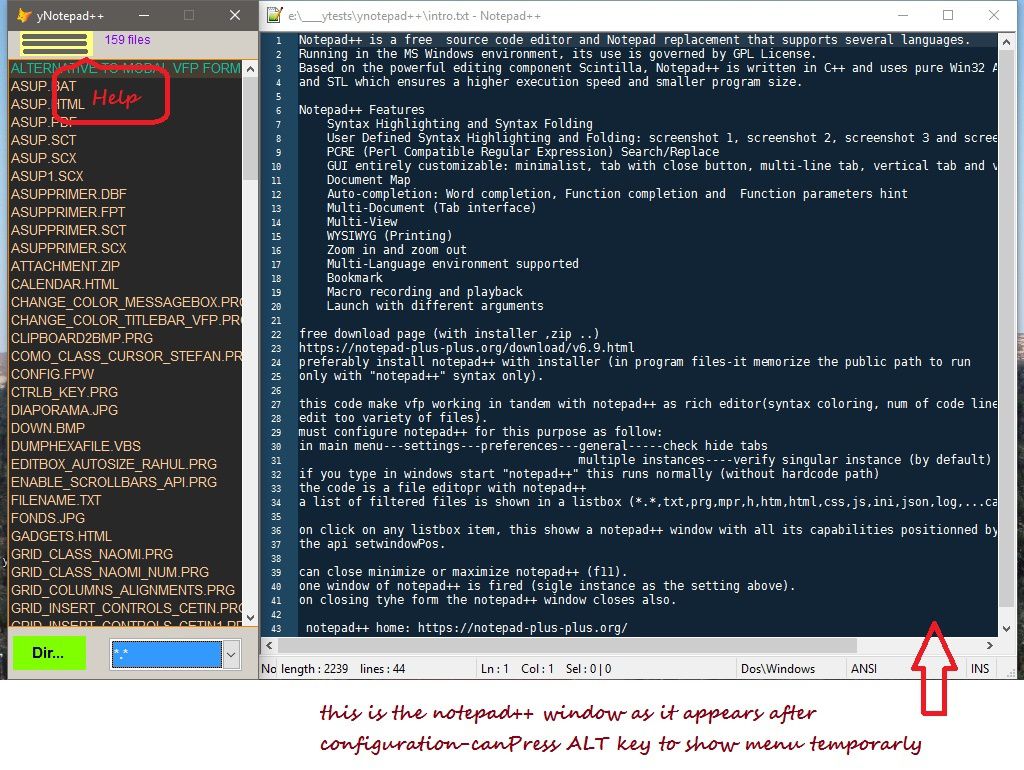
This notepad++ window is managed with native command line
on click on any listbox item, this shows a notepad++ window with all its capabilities positionned by the api setwindowPos.Inforyunatly must make some indesirable timeout to make it working.
the command line settings are on the form(under the listbox).Each setting takes effect next notepad++ start.
can close minimize or maximize notepad++ (f11).
one window of notepad++ is fired (single instance as the setting above).
on closing tyhe form the notepad++ window closes also even if notepad++ have the focus.

notepad++ home: https://notepad-plus-plus.org/
Click on code to select [then copy] -click outside to deselect
*save this code as yfindWindow.prg its a part of code *1*
*it finds the handle of any desktop visible window given by its title or a part of it.its called by ynotepad++.prg with a file as parameter.
*its better than findwindow (needs exact caption) used directly but makes some timeout to return result.

Lparameters lcfile
If !Pcount()=1
    Return .F.
Endi


Local tcTitle
tcTitle=Justfname(lcfile)
* #DEFINE WM_CLOSE 0x0010
Do yDeclare
Local hParent, hWindow, cTitle, cRect
hParent = GetDesktopWindow()
hWindow = 0

Create Cursor cs (winhandle I,;
	x0 I, y0 I, x1 I, y1 I, wintitle C(200))

Do While .T.
	Store Replicate(Chr(0),255) To cClass, cTitle
	hWindow = FindWindowEx(hParent, hWindow,;
		Null, Null)
	If hWindow = 0
* 123=ERROR_INVALID_NAME
* 127=ERROR_PROC_NOT_FOUND
* messagebox("Exit on error:"+trans(GetLastError()) )
		Exit
	Else
		cTitle = GetWinText(hWindow)
		cRect = GetWinRect(hWindow)
		Insert Into cs Values (hWindow,;
			buf2dword(Substr(cRect, 1,4)),;
			buf2dword(Substr(cRect, 5,4)),;
			buf2dword(Substr(cRect, 9,4)),;
			buf2dword(Substr(cRect, 13,4)),;
			cTitle)
	Endif
Enddo
Select cs
Locate
Scan
	If Lower(tcTitle) $ Lower(wintitle)
		_Screen.hWindow= winhandle
		_Screen.xTitle=wintitle
		Return
	Endi
Endscan
Retu

Function GetWinText(hWindow)
Local cBuffer
cBuffer = Replicate(Chr(0), 255)
= GetWindowText(hWindow, @cBuffer, Len(cBuffer))
Return Strtran(cBuffer, Chr(0), "")

Function GetWinRect(hWindow)
Local cBuffer
cBuffer = Replicate(Chr(0), 16)
= GetWindowRect(hWindow, @cBuffer)
Return cBuffer

Procedure yDeclare
Declare Integer GetLastError In kernel32
Declare Integer GetDesktopWindow In user32
Declare Integer FindWindowEx In user32;
	INTEGER hwndParent, Integer hwndChildAfter,;
	STRING @lpszClass, String @lpszWindow

Declare Integer GetWindowText In user32;
	INTEGER HWnd, String @lpString, Integer nMaxCount
Declare Integer GetWindowRect In user32;
	INTEGER HWnd, String lpRect
Declare Integer SendMessage In Win32API;
	INTEGER HWnd,;
	INTEGER uMsg,;
	INTEGER wParam,;
	INTEGER Lparam

Function buf2dword(lcBuffer)
Return Asc(Substr(lcBuffer, 1,1)) + ;
	BitLShift(Asc(Substr(lcBuffer, 2,1)),  8) +;
	BitLShift(Asc(Substr(lcBuffer, 3,1)), 16) +;
	BitLShift(Asc(Substr(lcBuffer, 4,1)), 24)

*this code is adapted for a part from www.news2news.com
Click on code to select [then copy] -click outside to deselect
*1* ynotepad++.prg   (notepad++ mandatory installed on system)

Publi yform
yform=Newobject("ynotepad")
yform.Show
Read Events
Retu
*
Define Class ynotepad As Form
    Top = 6
	Left = 46
	Height = 580
	Width = 250
	ShowWindow = 2
	ShowTips = .T.
	Caption = "yNotepad++"
	MaxButton = .F.
	BackColor = Rgb(212,208,200)
	yp = .F.
	ydir = .F.
	nhandle = 0
	tour = 0

	Add Object ycont As ycont With ;
		Top = 0, ;
		Left = 12, ;
		Width = 73, ;
		Height = 25, ;
		BorderWidth = 0, ;
		MousePointer = 15, ;
		BackColor = Rgb(255,255,128), ;
		Name = "ycont"

	Add Object list1 As ListBox With ;
		Anchor = 15, ;
		Height = 500, ;
		Left = 0, ;
		Top = 28, ;
		Width = 252, ;
		ItemTips = .T., ;
		Name = "List1"

	Add Object command1 As CommandButton With ;
		Top = 540, ;
		Left = 5, ;
		Height = 30, ;
		Width = 73, ;
		FontBold = .T., ;
		FontSize = 11, ;
		Anchor = 768, ;
		Caption = "GetDir...", ;
		MousePointer = 15, ;
		SpecialEffect = 2, ;
		ForeColor = Rgb(255,0,0), ;
		BackColor = Rgb(128,255,0), ;
		Name = "Command1"

	Add Object combo1 As ComboBox With ;
		FontBold = .T., ;
		FontSize = 10, ;
		Anchor = 768, ;
		Height = 28, ;
		Left = 101, ;
		Top = 542, ;
		Width = 103, ;
		Name = "Combo1"

	Add Object label1 As Label With ;
		Anchor = 768, ;
		BackStyle = 0, ;
		Caption = "", ;
		Height = 25, ;
		Left = 96, ;
		Top = 0, ;
		Width = 145, ;
		ForeColor = Rgb(128,0,255), ;
		Name = "Label1"

	Add Object ysetting As ysetting
	Name="ysetting"

	Procedure ypos
	Lparameters lcfile
	If !Pcount()=1
		Return .F.
	Endi
	sleep(1000)
	_Screen.hwindow=0
	Do yfindWindow.prg  With Justfname(m.lcfile)
	sleep(1000)   &&mandatory to make the code working
	Thisform.nhandle=_Screen.hwindow

	Try
		If  Thisform.nhandle # 0
* positioning
			Local xleft,xtop,xwidth,xheight
			xleft=Thisform.Left+Thisform.Width+1
			xtop=Thisform.Top
			xwidth=Sysmetric(1)-Thisform.Width-Thisform.Left
			xheight=Thisform.Height+Sysmetric(9)+Sysmetric(4)+Sysmetric(3)
			#Define  SWP_SHOWWINDOW  0x0040
			= SetWindowPos(Thisform.nhandle,0, xleft, xtop,  xwidth, xheight , SWP_SHOWWINDOW)
		Endi

	Catch
		Messagebox("An error was occured",16+4096,"Error ypos",1200)
	Endtry
	Endproc

	Procedure yhd
	m.delta=20
	If Thisform.yp=.F.
		Thisform.yp=.T.
		With Thisform.list1
			Do While  .Left<=0
				.Left=.Left+m.delta
				Inke(0.1)
			Enddo
			.Left=0
		Endwith

	Else

		Thisform.yp=.F.
		With Thisform.list1
			Do While .Left+.Width>0
				.Left=.Left-m.delta
				Inke(0.1)
			Enddo
			.Left=-.Width
		Endwith
	Endi
	Endproc

	Procedure yhelp
	Local m.myvar
	TEXT to m.myvar noshow
		Notepad++ is a free  source code editor and Notepad replacement that supports several languages.
		Running in the MS Windows environment, its use is governed by GPL License.
		Based on the powerful editing component Scintilla, Notepad++ is written in C++ and uses pure Win32 API
		and STL which ensures a higher execution speed and smaller program size.
		Notepad++ Features
		    Syntax Highlighting and Syntax Folding (see notepad++ menu and great variety of themes)
		    User Defined Syntax Highlighting and Folding: screenshot 1, screenshot 2, screenshot 3 and screenshot 4
		    PCRE (Perl Compatible Regular Expression) Search/Replace
		    GUI entirely customizable: minimalist, tab with close button, multi-line tab, vertical tab and vertical document list
		    Document Map
		    Auto-completion: Word completion, Function completion and  Function parameters hint
		    Multi-Document (Tab interface)
		    Multi-View
		    WYSIWYG (Printing)
		    Zoom in and zoom out
		    Multi-Language environment supported
		    Bookmark
		    Macro recording and playback
		    Launch with different arguments
		free download page (with installer ,zip ..)
		https://notepad-plus-plus.org/download/v6.9.html
		preferably install notepad++ with installer as i made with this application (in program files-it memorize the public path to run
		only with "notepad++" syntax only).

		this code make vfp working in tandem with notepad++ as rich editor(syntax coloring, num of code lines,as in this link:
		http://docs.notepad-plus-plus.org/index.php/Command_Line_Switches#Examples
		(see  the code in list1.click)
		edit too variety of files).
		must configure notepad++ for this purpose as follow:
		in main menu---settings---preferences---general-----check hide tabs
		                                        multiple instances----verify singular instance (by default)
		if you type in windows start "notepad++" this runs normally (without hardcode path)
		the code is a file editopr with notepad++
		a list of filtered files is shown in a listbox (*.*,txt,prg,mpr,h,htm,html,css,js,ini,json,log,...can do more)

		This notepad++ window is managed with native command line
		on click on any listbox item, this showw a notepad++ window with all its capabilities positionned by
		the api setwindowPos.
		can close minimize or maximize notepad++ (f11).
		one window of notepad++ is fired (sigle instance as the setting above).
		on closing tyhe form the notepad++ window closes also.
		notepad++ home: https://notepad-plus-plus.org/
		notepad++ Shortcuts:http://docs.notepad-plus-plus.org/index.php/Keyboard_And_Mouse_Shortcuts
	ENDTEXT
	Declare Integer MessageBox In user32 As MessageBoxA ;
		INTEGER HWnd,;
		STRING  lpText,;
		STRING  lpCaption,;
		INTEGER wType

	#Define MB_ICONINFORMATION 0x00000040
	#Define MB_OK 0x00000000
	#Define MB_APPLMODAL 0x00000000
	#Define  MB_DEFBUTTON1 0x00000000
	=MessageBoxA(Thisform.HWnd,m.myvar,"Summary Help",MB_APPLMODAL+MB_OK +MB_ICONINFORMATION +MB_DEFBUTTON1 )
    *messageBoxA sensitive
	Endproc

	Procedure fheight
	With Thisform
		.Top=0
		.Height=Sysmetric(2)-15
		.ypos(Allt(Thisform.ydir)+Allt(Thisform.list1.Value))
	Endwith
	Endproc

	Procedure yalt
	Lparameters N
	If !Pcount()=1
		Return .F.
	Endi
	#Define MOUSEEVENTF_ABSOLUTE     0x8000 && The dx and dy parameters contain normalized absolute coordinates. If not set, those parameters contain relative data: the change in position since the last reported position. This flag can be set, or not set, regardless of what kind of mouse or mouse-like device, if any, is connected to the system. For further information about relative mouse motion, see the following Remarks section.
	#Define MOUSEEVENTF_LEFTDOWN     0x0002  &&The left button is down.
	#Define MOUSEEVENTF_LEFTUP     0x0004  &&The left button is up.
	#Define MOUSEEVENTF_MIDDLEDOWN      0x0020   &&The middle button is down.
	#Define MOUSEEVENTF_MIDDLEUP    0x0040 && The middle button is up.
	#Define MOUSEEVENTF_MOVE    0x0001    &&Movement occurred.
	#Define MOUSEEVENTF_RIGHTDOWN     0x0008  && The right button is down.
	#Define MOUSEEVENTF_RIGHTUP     0x0010    && The right button is up.
	#Define MOUSEEVENTF_WHEEL     0x0800  && The wheel has been moved, if the mouse has a wheel. The amount of movement is specified in dwData
	#Define MOUSEEVENTF_XDOWN     0x0080  && An X button was pressed.
	#Define MOUSEEVENTF_XUP     0x0100    &&An X button was released
	#Define MOUSEEVENTF_WHEEL     0x0800  &&The wheel button is rotated.
	#Define MOUSEEVENTF_HWHEEL     0x01000 && The wheel button is tilted.

	x=Thisform.Left+Thisform.Width+50
	Y=Thisform.Top+70
	=SetCursorPos(x,Y)
	=Inkey(0.2)
	mouse_event(MOUSEEVENTF_LEFTDOWN +MOUSEEVENTF_LEFTUP,0,0,0,0) && left mouse down+up

	Do Case
	Case N=1  &&ALT for menu
		#Define KEYEVENTF_KEYUP 2
		#Define VK_MENU 0x12 &&ALT key
		= keybd_event(VK_MENU, 0, 0, 0)
		= keybd_event(VK_MENU, 0, KEYEVENTF_KEYUP, 0)
		DoEvents

	Case N=2   &&Botepad++ fullscreen (f11)
		#Define KEYEVENTF_KEYUP 2
		#Define VK_F11 0x7A  &&F11 key

		= keybd_event(VK_F11, 0, 0, 0)
		= keybd_event(VK_F11, 0, KEYEVENTF_KEYUP, 0)
		DoEvents
		Messagebox("issue F11 to restore notepad++ or click on +",0+32+4096,'',2000)
	Endcase

	Retu
	Endproc

	Procedure Moved
*if thisform.tour>0
*sleep(500)
*thisform.ypos(thisform.ydir+allt(thisform.list1.value))
*endi
	Endproc

	Procedure QueryUnload
*close notepad++ window if exists.if focus in on notepad++, make focus on form otherwise notepad++ dont close
	If Thisform.nhandle#0
		Local x,Y
		x=Thisform.combo1.Left+Thisform.combo1.Width+10
		Y=Thisform.combo1.Top
		=SetCursorPos(x,Y)
		=Inkey(0.2)
		mouse_event(MOUSEEVENTF_LEFTDOWN +MOUSEEVENTF_LEFTUP,0,0,0,0) && left mouse down+up
		#Define WM_CLOSE 0x0010
		SendMessage(Thisform.nhandle,WM_CLOSE,0,0)
	Endi

	Endproc

	Procedure Activate
	If Thisform.tour=0
		Thisform.tour=1
		Thisform.yhd()
	Endi
	Endproc

	Procedure Init
	_Screen.WindowState=1
	Publi m.yrep
	m.yrep=Addbs(Justpath(Sys(16,1)))

	With _Screen
		.AddProperty("hWindow",0)
		.AddProperty("xtitle","")
	Endwith

	With This
		.Left=0
		.Top=0
		.Width=250
		.Height=Sysmetric(2)-120
	Endwith

	Thisform.ydir=m.yrep
	Thisform.command1.ToolTipText=Thisform.ydir
*
	Create Cursor ycurs (yfile c(150))
	gnbre=Adir(gabase,Thisform.ydir+"*.*")
	For i=1 To gnbre
		Insert Into ycurs Values(gabase(i,1))
	Endfor
	Sele ycurs
*brow
	Locate

	With Thisform.list1
		.RowSource = "ycurs.yfile"
		.RowSourceType=2
		.Visible=.T.
		.SelectedItemBackColor=Rgb(70,60,50)
		.SelectedItemForeColor=Rgb(10,191,160)
		.SpecialEffect=1
		.FontSize=10
		.ItemBackColor=Rgb(40,40,40)
		.ItemForeColor=Rgb(255,204,153)
		.BorderColor=Rgb(235,132,0)
		.ItemTips=.T.
		.MousePointer=15
		.Left=-.Width
	Endwith
	Thisform.label1.Caption=Trans(Reccount())  +" files"
	Thisform.tour=0
	Thisform.combo1.Click
	Endproc

	Procedure Load
	Declare Integer Sleep In kernel32 Integer
	Declare Integer FindWindow In user32;
		STRING lpClassName, String lpWindowName
	Declare Integer SetWindowPos In user32;
		INTEGER HWnd,;
		INTEGER hWndInsertAfter,;
		INTEGER x,;
		INTEGER Y,;
		INTEGER cx,;
		INTEGER cy,;
		INTEGER wFlags
	Declare Integer SendMessage In user32;
		INTEGER HWnd,;
		INTEGER Msg,;
		INTEGER wParam,;
		INTEGER Lparam
	Declare Integer ShellExecute In SHELL32.Dll Integer nWinHandle,;
		STRING cOperation,;
		STRING cFileName,;
		STRING cParameters,;
		STRING cDirectory,;
		INTEGER nShowWindow
	Declare Integer ShowWindow In WIN32API Integer, Integer
	Declare Integer SetFocus In user32 As SetFocusA Integer hWindow
	Declare Integer GetActiveWindow In user32
	Declare keybd_event In user32;
		SHORT bVk,;
		SHORT bScan,;
		INTEGER dwFlags,;
		INTEGER dwExtraInfo
	Declare Integer SetCursorPos In WIN32API Integer, Integer
	Declare mouse_event In WIN32API Integer,Integer,Integer,Integer,Integer

*setwindowPos: https://msdn.microsoft.com/en-us/library/windows/desktop/ms633545%28v=vs.85%29.aspx
	Endproc

	Procedure Resize
	Try
		sleep(500)
		Thisform.ypos(Allt(Thisform.ydir)+Allt(Thisform.list1.Value))
	Catch
	Endtry
	Endproc

	Procedure Destroy
	Clea Events
	Endproc

	Procedure list1.Click
*notepad++ command line used in this application &&warning :syntax sensitive
*http://docs.notepad-plus-plus.org/index.php/Command_Line_Switches#Examples
*notepad++ [--help] [-multiInst] [-noPlugins] [-lLanguage]
* [-nLineNumber] [-cColumnNumber] [-xPos] [-yPos]
* [-nosession] [-notabbar] [-ro] [-systemtray] [-alwaysOnTop]
*[-Llanguege code] [-r]

	Local m.lcfile
	m.lcfile=Thisform.ydir+Allt(This.Value)
	If Empty(m.lcfile)
		Return .F.
	Endi

	Local xnotabBar,xnoPlugins,xro,xnosession,xconfig
	m.xnotabBar=Iif(Thisform.ysetting.check1.Value=1," -notabbar ","")
	m.xnoPlugins=Iif(Thisform.ysetting.check2.Value=1," -noPlugins ","")
	m.xnosession=Iif(Thisform.ysetting.check3.Value=1," -nosession ","")
	m.xro=       Iif(Thisform.ysetting.check4.Value=1," -ro ","")

	m.xconfig=m.xnotabBar+m.xnoPlugins+m.xnosession+m.xro

	Local m.myvar
	TEXT to m.myvar textmerge noshow
	-x<<thisform.left+thisform.width>> -y<<thisform.top>>  <<m.xconfig>>  <<m.lcfile>>
	ENDTEXT

	result = ShellExecute(0, "open", "notepad++",m.myvar,"",1)
	Thisform.ypos(m.lcfile)
*the -x and -y parameters are superflue because the setWindowAPI does the job.
	Endproc

	Procedure command1.Click
	Thisform.ydir=Getdir(m.yrep,"","open a folder",16384)
	If Empty(Thisform.ydir)
		Thisform.ydir=m.yrep
	Else
		Thisform.ydir=Addbs(Thisform.ydir)
	Endi
	Thisform.command1.ToolTipText=Thisform.ydir
	Thisform.combo1.Click
	Endproc

	Procedure combo1.Click
	Zap In Select("ycurs")
	Local gnbre
	gnbre=Adir(gabase,Thisform.ydir+This.Value)
	For i=1 To gnbre
		Insert Into ycurs Values(gabase(i,1))
	Endfor

	Locate
	Thisform.list1.Requery()

	Thisform.label1.Caption=Trans(gnbre)  +" files"
	Endproc

	Procedure combo1.Init
	With This
		.AddItem("*.* ")
		.AddItem("*.txt")
		.AddItem("*.prg")
		.AddItem("*.h")
		.AddItem("*.mpr")
		.AddItem("*.htm")
		.AddItem("*.html")
		.AddItem("*.css")
		.AddItem("*.js")
		.AddItem("*.ini")
		.AddItem("*.json")
		.AddItem("*.log")
		.ListIndex=1
		.Style=2
	Endwith
	Endproc

Enddefine
*
*-- EndDefine: ynotepad

Define Class ycont As Container
	Top = 0
	Left = 12
	Width = 73
	Height = 25
	BorderWidth = 0
	MousePointer = 15
	BackColor = Rgb(255,255,128)
	Name = "ycont"

	Add Object line1 As Line With ;
		BorderWidth = 5, ;
		Height = 0, ;
		Left = 4, ;
		Top = 5, ;
		Width = 60, ;
		Name = "Line1"

	Add Object line2 As Line With ;
		BorderWidth = 5, ;
		Height = 0, ;
		Left = 4, ;
		Top = 12, ;
		Width = 60, ;
		Name = "Line2"

	Add Object line3 As Line With ;
		BorderWidth = 5, ;
		Height = 0, ;
		Left = 5, ;
		Top = 20, ;
		Width = 60, ;
		Name = "Line3"

	Procedure Click
	Define Popup raccourci SHORTCUT Relative From Mrow(),Mcol()
	Define Bar 1 Of raccourci Prompt "Summary help"
	Define Bar 2 Of raccourci Prompt "Hide/show list-Settings"
	Define Bar 3 Of raccourci Prompt "full screen height"
	Define Bar 4 Of raccourci Prompt "Show notepad++ menu"
	Define Bar 5 Of raccourci Prompt "Show notepad++ fullscreen"

	On Selection Bar 1 Of raccourci _Screen.ActiveForm.yhelp()
	On Selection Bar 2 Of raccourci _Screen.ActiveForm.yhd()
	On Selection Bar 3 Of raccourci _Screen.ActiveForm.fheight()
	On Selection Bar 4 Of raccourci _Screen.ActiveForm.yalt(1)
	On Selection Bar 5 Of raccourci _Screen.ActiveForm.yalt(2)

	Activate Popup raccourci
	Endproc

	Procedure line1.Click
	This.Parent.Click
	Endproc

	Procedure line2.Click
	This.Parent.Click
	Endproc

	Procedure line3.Click
	This.Parent.Click
	Endproc

Enddefine
*
*-- EndDefine: ycont
*
Define Class ysetting As Container
	Anchor = 768
	Top = 60
	Left = 12
	Width = 204
	Height = 156
	BorderWidth = 0
	BackColor = Rgb(128,255,0)
	Name = "ysetting"

	Add Object check1 As Checkbox With ;
		Top = 45, ;
		Left = 12, ;
		Height = 17, ;
		Width = 73, ;
		AutoSize = .T., ;
		Alignment = 0, ;
		BackStyle = 0, ;
		Caption = "noTABBar", ;
		Value = 1, ;
		Name = "Check1"

	Add Object check2 As Checkbox With ;
		Top = 73, ;
		Left = 11, ;
		Height = 17, ;
		Width = 74, ;
		AutoSize = .T., ;
		Alignment = 0, ;
		BackStyle = 0, ;
		Caption = "noPlugins", ;
		Value = 1, ;
		Name = "Check2"

	Add Object check3 As Checkbox With ;
		Top = 99, ;
		Left = 12, ;
		Height = 17, ;
		Width = 78, ;
		AutoSize = .T., ;
		Alignment = 0, ;
		BackStyle = 0, ;
		Caption = "noSession", ;
		Value = 1, ;
		Name = "Check3"

	Add Object check4 As Checkbox With ;
		Top = 127, ;
		Left = 11, ;
		Height = 17, ;
		Width = 76, ;
		AutoSize = .T., ;
		Alignment = 0, ;
		BackStyle = 0, ;
		Caption = "ReadonLY", ;
		Value = 1, ;
		Name = "Check4"

	Add Object label1 As Label With ;
		AutoSize = .T., ;
		FontBold = .T., ;
		FontName = "Segoe Script", ;
		FontSize = 14, ;
		BackStyle = 0, ;
		Caption = "Notepad++ Settings", ;
		Height = 33, ;
		Left = 1, ;
		Top = 0, ;
		Width = 190, ;
		ForeColor = Rgb(255,0,0), ;
		Name = "Label1"

	Procedure Init
	With This
		.SetAll("mousepointer",15,"checkBox")
		.ZOrder(1)
	Endwith
	Endproc


Enddefine
*
*-- EndDefine: ysetting


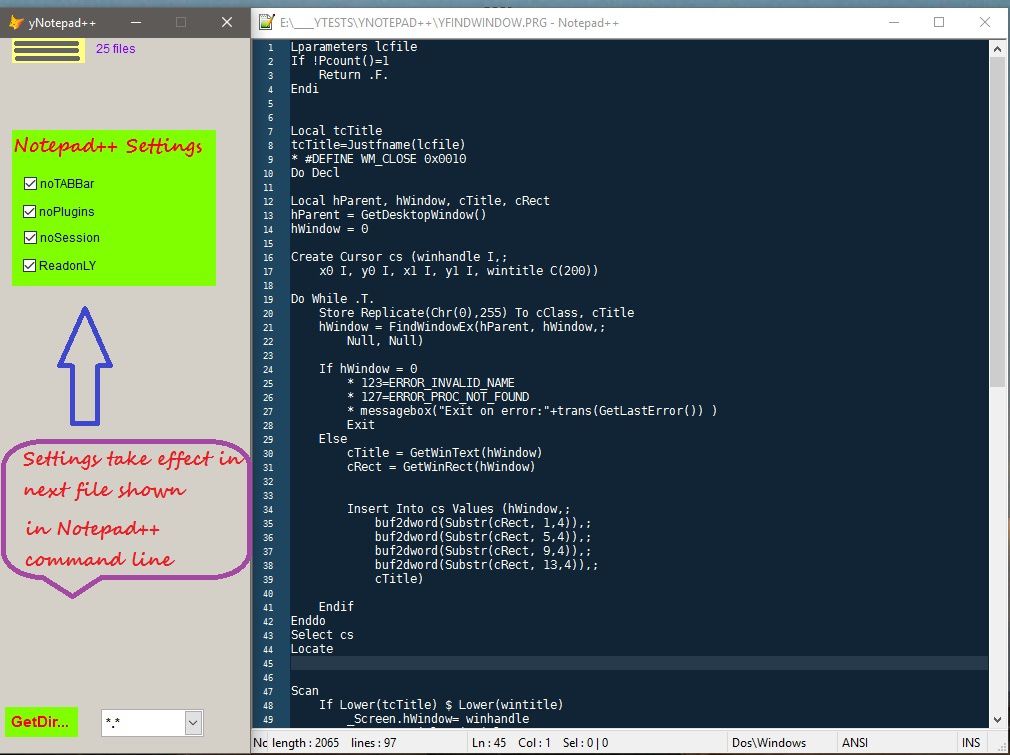
Note: notepad++ memorize always its last window opened and start with exactly this location.See the settings on form.I readonly=.f. notepad++ asks always to save fie if any modification is made on.
Important:All Codes above are tested on VFP9SP2 & windows 10 pro & Notepad++ version 6.8.8 and 6.9 To avoid some problems with priveleges level, run vfp9.exe as administrator.
Please come back with any bug.correcting code is usefull to all readers.
/image%2F1435407%2F20150212%2Fob_48cb5c_demo1.jpg)
A notepad viewer embed on vfp form - Visual Foxpro codes
yNotepad_Viewer This is a lister and editor of any kind of txt file (htm,html,prg,mpr,log,h,....) Its based essentially on the windows notepad.exe who is an awesome tool for texts ANSI, UNICODE and
http://yousfi.over-blog.com/2015/02/a-notepad-viewer-embed-on-vfp-form.html
In this link notepad.exe is embed by API setParent but notepad++ here is standalone.